Integrations
Cursor Integration
Open your PRDs directly in Cursor IDE to start building features
Cursor Integration
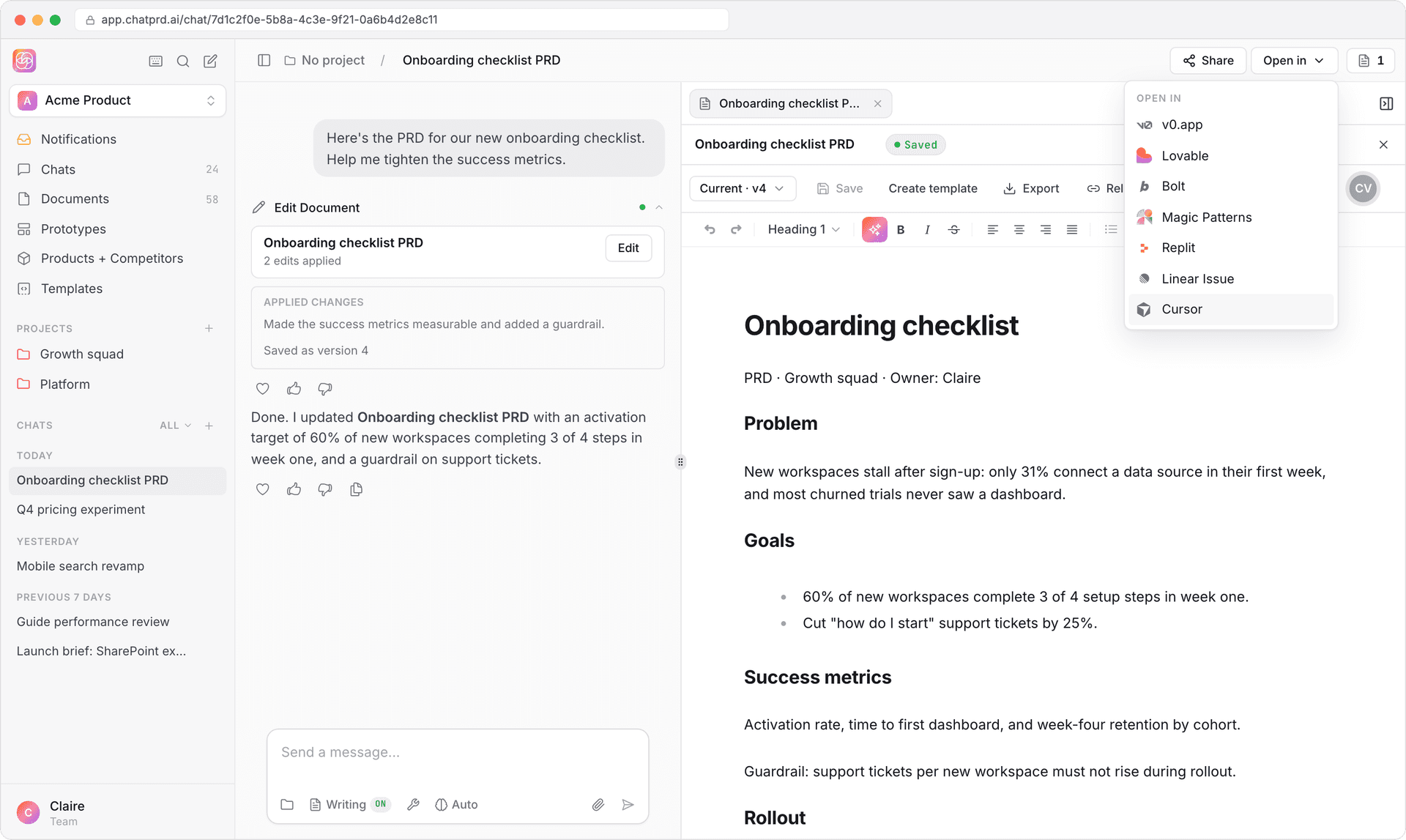
ChatPRD integrates with Cursor IDE, allowing you to quickly open your PRDs and specifications directly in Cursor to start building features.
What is Cursor?
Cursor is an AI-powered code editor built on VS Code that helps developers write code faster. By integrating ChatPRD with Cursor, you can seamlessly transition from product specification to implementation.
How to Use
- Open any document in ChatPRD
- Click the "Open in" dropdown in the chat header (it appears once the chat has a document)
- Select "Cursor" to open in the Cursor desktop app
What Happens
When you click "Open in Cursor", ChatPRD will:
- Compress your document content into a prompt
- Generate a Cursor deeplink with your PRD content
- Open Cursor IDE with your document ready as context
This allows you to immediately start asking Cursor to help you implement the features described in your PRD.
Requirements
- Cursor IDE installed on your computer
- A document open in ChatPRD
Tips
- Use detailed PRDs with clear acceptance criteria for best results
- Include technical specifications in your document when possible
- You can edit the prompt before opening in Cursor if you want to add additional context
The Cursor integration is available on all ChatPRD plans.
Last updated Oct 12, 2026
Ready to get started? You can try ChatPRD for free 👉Sign Up Now