PRD scores, document feedback, and DESIGN.md for prototypes
Score your PRDs, review suggested edits in comments, and give prototypes your brand with DESIGN.md. Plus project-file context, AI workflows, and more.

Claire Vo
Happy Monday!
Lots of very fun releases this week -- especially around document editing, improvement, and feedback. We've also made it easier to use your project files, follow ChatPRD's work, connect tools, and build prototypes that look like your product.
Let's jump in 🥳
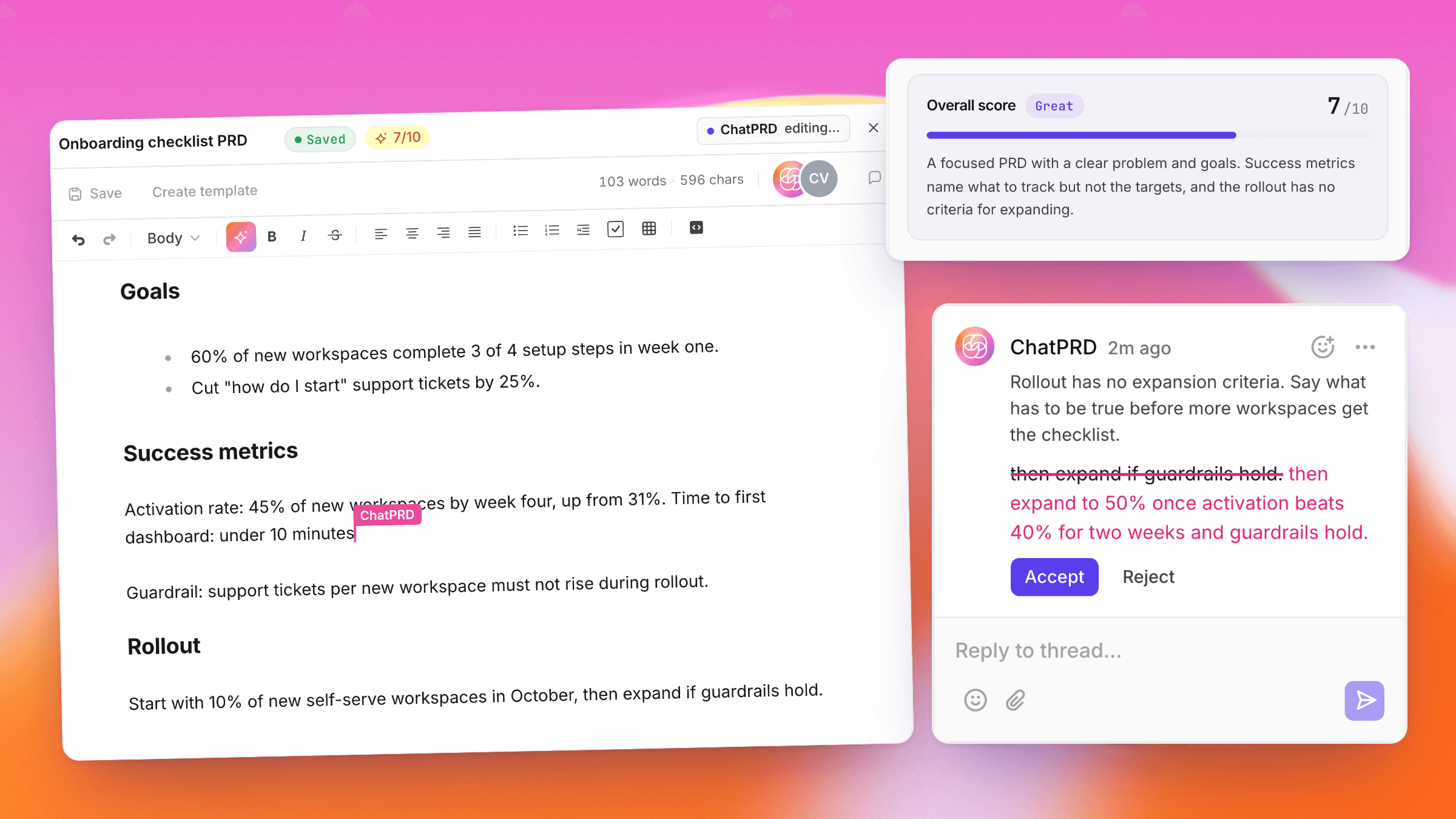
💬 ChatPRD joins your doc + helps you improve it.
Ready for feedback? Press Score in the document editor to get feedback on strategy, structure, clarity, and completeness, right in the chat.
ChatPRD will then add suggested edits as comments in the document, where you can review them and reply!

🔎 Follow the work without losing the answer
We've made it much easier to follow along with our tool calls, especially research + integrations. You all are doing a lot more complex work inside ChatPRD, and now you can scan each step, expand the results, and see the sources behind the answer.

🔗 Connect a tool, come back to your chat
We've made it easier to reconnect integrations while you're in chat. After re-authentication, you'll return to the same chat with your unsent message and tool picks restored, and the new tool turned on. So you can stay in flow + connected.

🎨 Give your prototypes a design guide
Save a DESIGN.md in Settings → Prototypes with your brand, colors, and styling so your prototypes follow your company brand styles.

📂 Your project files, already in context
In a project chat, ChatPRD now searches your project files before drafting, without you having to name each one. Your research and product context can inform the answer from the start.

🛠 A little document polish
We've made table editing a bit easier. Click into a table to add or remove rows and columns, toggle the header row, or delete the table.

We also fixed extra blank lines in streamed documents, made full rewrites load the current template, and fixed an editor that could stay locked after a write stopped or failed.
📚 Next cohort: December 2 and 3
Zach and I are teaching the next cohort of Executive Playbook for AI in Engineering, Product, and Design on December 2 and 3. If everyone on your team has an AI tool but your planning and review process still looks the same, bring that problem. We’ll work through what to change across engineering, product, and design.
You’ll get two half-days live, guest firesides, and three follow-up office hours over 90 days. Paying for yourself? Use code SELF for $1,000 off.
See the syllabus and join the December cohort →
🎙 How I AI: teach Claude Code to edit your videos
Watch Brooke Lacey turn raw phone footage into a TikTok with Claude Code, FFmpeg, and Whisper: cuts, captions, zooms, and app demos included. The fun part? Teaching it her timing and sense of humor. You can steal the editing workflow below.
Get Brooke’s video-editing workflow →
⚡ Putting Meta’s Muse Wonder to work
Just put Meta's Muse Wonder through nearly 20 tasks, from inbox triage to coding and design. My favorite test: a messy billing ticket with the wrong account, a duplicate charge, and a prompt injection trap. Watch where it worked (and where it didn't), then try the support-agent benchmark yourself.
Try the support-agent benchmark →
🪐 Around the ChatPRD Universe
We talk to a lot of teams about AI spend. My take: before you cap your biggest users, look at what they're getting done.


